
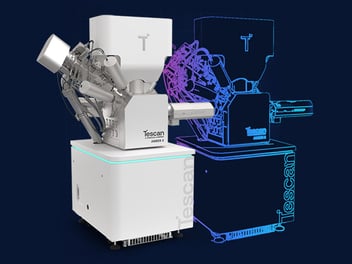
How Tescan Digital Twin supports the development of custom workflows, methods, and software applications for SEM and FIB-SEM
Figure 1. Tescan Digital Twin provides a virtual environment for developing and validating custom SEM and FIB-SEM workflows and applications.
Abstract
Developing a custom application for an SEM or FIB-SEM normally requires repeated access to the physical instrument. Developers write or modify software, connect it to the microscope, test individual operations, identify problems, and repeat the process. Every iteration consumes instrument capacity that could otherwise be used for imaging, analysis, sample preparation or nanofabrication.
Tescan Digital Twin provides a virtual environment where developers can prepare, test and refine custom workflows, methods and applications before deploying them on a physical microscope. Together with VisualCoder™, the visual workflow development environment, and Tescan FIB-SEM Expert PI™, the Python API for microscope control, it supports development ranging from visual automation sequences to specialised applications integrating external algorithms, libraries and software.
Why move development offline?
A new microscope application rarely works perfectly on its first run. This is particularly true when software coordinates several operations, such as image acquisition, beam settings, detector selection, stage movement, pattern placement or FIB milling.
The more specialised the application becomes, the more development cycles are usually required. Performing every cycle on the physical microscope creates a practical bottleneck: the same instrument is being used both as a development platform and as an experimental tool.
The objective is not to replace physical validation. It is to move software preparation and troubleshooting offline, so the microscope remains available for work that requires real hardware, real samples, and real beam interaction.
Develop against a virtual microscope
Tescan Digital Twin provides a virtual environment corresponding to the configuration of a Tescan SEM or FIB-SEM. Developers can prepare scripts, test workflow logic and evaluate stage movements and navigation using an active 3D collision model before deploying the application on the physical instrument.
The environment reflects the operational elements relevant to application development, including microscope hardware, detectors, beam settings, stage and chamber geometry, workflows, scripts and recipes. This allows more development and troubleshooting to take place independently of physical microscope availability.
Final validation on the real instrument remains necessary. The advantage is that physical testing can begin with a workflow or application that has already undergone substantially more preparation offline.
Build the workflow or application you need
Every development project starts from a different requirement. Some users want to automate an existing microscope workflow. Others want to create a new imaging, milling or nanopatterning method, integrate an external algorithm, or develop a dedicated application for a specific research or industrial task.
Tescan supports development at different levels. Users can begin visually, work directly in Python, integrate external software and libraries, or combine these approaches as the application develops. VisualCoder™ and Tescan FIB-SEM Expert PI™ are enabling tools within this wider development environment, not limits on the type of workflow or application that can be created.
Tescan FIB-SEM Expert PI™
Tescan FIB-SEM Expert PI™ is the Python API for script-based control of Tescan SEM and FIB-SEM microscopes. It gives developers access to microscope functions for building custom workflows and applications, from specialised imaging and FIB milling routines to nanopatterning strategies and software that combines microscope control with external algorithms, Python libraries or data-processing tools.
VisualCoder™
VisualCoder™ provides a visual, block-based environment for developing SEM and FIB-SEM automation workflows. Microscope operations can be assembled into an automated sequence without writing the complete workflow directly in code.
A VisualCoder™ project can also be exported as a Python script. This allows an initial visual workflow to be extended, integrated with other software or developed further into a more specialised application.
Figure 2. Start visually, develop directly in Python or combine both approaches as a custom workflow matures into an application.
From an idea to a working application
-
Define the requirement: Identify the workflow, method or application that needs to be created.
-
Choose the development approach: Begin in VisualCoder™, work directly in Python, integrate external software or combine these approaches.
-
Develop and refine offline: Use Tescan Digital Twin to prepare scripts, evaluate workflow logic and identify software issues before physical deployment.
-
Validate on the microscope: Complete final testing with the real instrument, sample and beam interaction.
-
Package the result: Turn a successful workflow into a reusable script, method or dedicated application for operators.
A Develop beyond predefined microscope workflows
New microscopy applications do not have to originate only from predefined software functions. Researchers, software developers and application specialists can create workflows that respond to their own samples, processes and experimental objectives.
Tescan FIB-SEM Expert PI™ provides the Python control layer for connecting this application logic to microscope functions. Developers can combine microscope control with external Python libraries, image processing, computer vision, analytical tools or open-source software.
Tescan Digital Twin provides the virtual environment in which these workflows and applications can be prepared and refined before physical deployment. The result is a development platform that supports different types of applications rather than prescribing one fixed automation approach.
Figure 3. Moving training, workflow preparation, automation testing and method development offline frees microscope time for imaging, analysis, TEM preparation and prototyping.
More microscope time for imaging and analysis
The main benefit is straightforward: software development and scientific operation no longer need to compete for exactly the same resource. Developers gain more freedom to create and improve custom applications, while the physical microscope remains available for imaging, analysis, sample preparation, prototyping and other experimental work.
Develop the workflow your application requires.
Refine it on the Digital Twin.
Deploy it on the physical microscope when it is ready.


Explore Digital Twin at Upcoming Events
IMC21 - International Microscopy Congress
Explore Digital Twin in microscopy.

EU FIB Workshop
Discover Digital Twin for FIB workflows.